Sending Data to KnocScore and Receiving Analysis Results
Server-to-Server: Supported endpoints, the payload schema, and the HTML/JavaScript and Java snippets you'll add to your own application to deliver interaction data for analysis.
Last Updated: October 17, 2026
1. How Data Travels Through the System
Data never moves directly from the end-user's browser to KnocScore. It always makes a round trip through your application server, which is the only party that holds your App-UUID and Secret. The flow looks like this:
- The end user interacts with your page or business app (practicing, writing, discussing, or studying) in their browser.
- Your front-end JavaScript (or your React app) collects that interaction data and sends it to your own application server — never directly to KnocScore.
- Your application server authenticates with KnocScore using your App-UUID and Secret, then POSTs the interaction payload to the KnocScore endpoint.
- KnocScore analyzes the data and returns a JSON result to your application server.
- Your application server relays (or summarizes) that result back to the end-user's browser so it can be displayed, for example, as a "View Results" button.
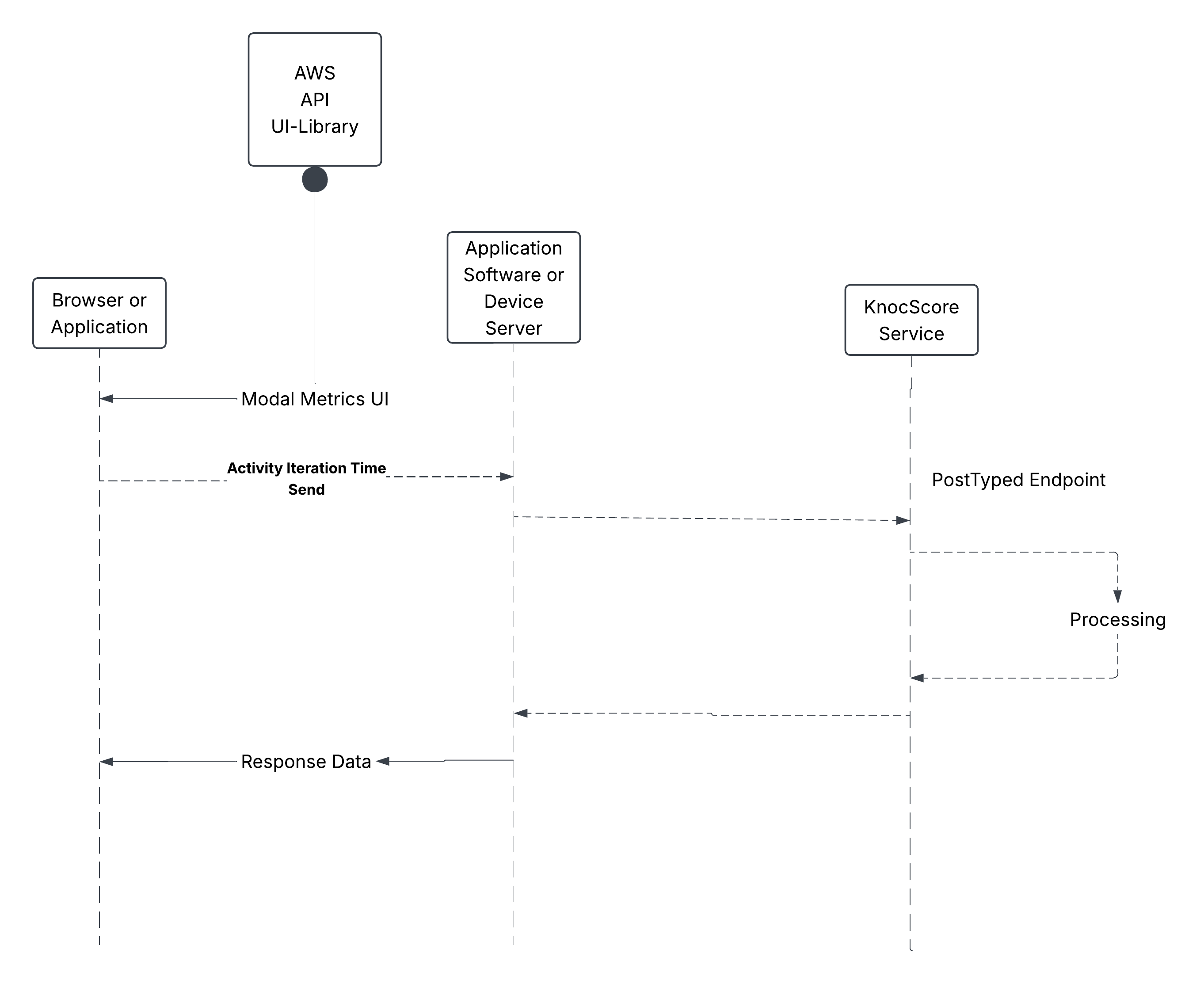
Your Secret must never reach the browser. It belongs only on your application server, where the request to KnocScore is actually made.
2. HTML & JavaScript Snippets for Your Pages
Whether your front end is a plain HTML page or a page rendered by a React app, the pattern is the same: collect the interaction data in the browser, then fetch() it to an endpoint on your own server — not to KnocScore directly.
                <script>

                    document.addEventListener("DOMContentLoaded", () => {
                        const payload = {
                        "interaction-data": {
                                "who": who,
                                "duration": duration,
                                "number_users": numberUsers,
                                "other_users": []
                            },
                            "corpus": corpus,
                        };

                        fetch("/your-own-server-route/send-interaction", {
                            method: "POST",
                            headers: { "Content-Type": "application/json" },
                            body: JSON.stringify(payload)
                        })
                            .then((response) => response.json().then((body) => ({status: response.status, body})))
                            .then(({status, body}) => {
                                statusEl.textContent = `Status: ${status}\n${JSON.stringify(body, null, 2)}`;

                                if (status === 200 && body.success === true && body.response) {
                                    latestResults = body.response;
                                    viewResultsBtn.dataset.numberUsers = numberUsers;
                                    viewResultsBtn.disabled = false;
                                    viewResultsBtn.classList.remove("ks-hidden");
                                    viewResultsBtn.classList.add("my-app-page-view-results-btn-ready");
                                }
                            })
                            .catch((error) => {
                                statusEl.textContent = `Request failed: ${error.message}`;
                            });
                        });
                    });
                </script>
Include these libraries in your HTML page.
                    // CSS, in the head of the page.
                    <link href="/app/style/testing/fake_app_page.css" rel="stylesheet" type="text/css">
                    <link href="/app/javascript/lib/success-modal/success-modal.css" rel="stylesheet" type="text/css">

                    // JavaScript, Prefereably at the bottom of the page before the closing body tag
                    <script src="/app/javascript/lib/success-modal/success-modal.js"></script>
                    <script src="/app/javascript/testing/fake_app_page.js"></script>
Your server-side route (/your-own-server-route/send-interaction above) is the one that actually calls the KnocScore endpoint described in the next section, attaching your App-UUID and Secret.
3. The Endpoint & Payload Schema
All endpoints follow a hex-coded template rather than a plain-text name. Your current, active endpoint is provided to you directly on your Dashboard and in your onboarding email — do not hardcode or share it outside your server environment.
POST
application/json
/<your-provided-template-code>
Required JSON payload shape:
                    {
                      "app-data": {
                        "app_uuid": "your-app-uuid",
                        "app_secret": "your-app-secret"
                      },
                      "interaction-data": {
                        "who": "end-user@example.com",
                        "duration": 30,
                        "number_users": 1,
                        "other_users": []
                      },
                      "corpus": "the raw session text to be analyzed"
                    }
| Field | Required | Description |
|---|---|---|
| app-data.app_uuid | Yes | Your application's unique identifier, from the Dashboard. |
| app-data.app_secret | Yes | Your application's secret. Keep it server-side only. |
| interaction-data.who | Yes | The end user's email. Used to identify or create their KnocScore profile. |
| interaction-data.duration | Yes | Total session time, in minutes. |
| interaction-data.number_users | Yes | Number of users involved in the interaction. |
| interaction-data.other_users | No | A JsonArray of any other participating user emails. |
| corpus | Yes | The raw session text KnocScore analyzes to produce the metrics. |
A successful response is a JSON object containing a status of "success" and the calculated metrics (avg_competence_score, avg_complexity_score, total_words_analyzed, total_time_minutes, unique_domains, unique_skills). If your credentials are invalid, you'll receive an error response instead — see your Dashboard's Testing Page to confirm your credentials are working before going live.
4. Java Example: Send and Receive
If your application server is written in Java, you can use any non-blocking HTTP client. The example below uses Vert.x's WebClient, sending a JsonObject and handling the response reactively.
                // Handler for your own route, e.g. POST /your-own-server-route/send-interaction
                private void sendInteractionToKnocScore(RoutingContext ctx) {

                JsonObject payload = new JsonObject()
                    .put("interaction-data", new JsonObject()
                        .put("who", userEmail)
                        .put("duration", sessionDurationMinutes)
                        .put("number_users", 1)
                        .put("other_users", new JsonArray())
                        )
                    .put("corpus", sessionCorpus);

                WebClient.create(vertx)
                    .post(443, "api.knocscore.com", "/<your-provided-template-code>")
                    .putHeader("Content-Type", "application/json")
                    .sendJsonObject(payload)
                    .onSuccess(response -> {
                        JsonObject body = response.bodyAsJsonObject();

                        if (response.statusCode() == 200 && body.getBoolean("success", false)) {
                            JsonObject result = body.getJsonObject("response");
                            // Relay the result straight back to the end user's browser,
                            // completing the round trip described in Section 1.
                            ctx.response()
                                .putHeader("Content-Type", "application/json")
                                .end(result.encode());
                        } else {
                            ctx.response().setStatusCode(502)
                                .end(new JsonObject().put("success", false).encode());
                        }
                    })
                    .onFailure(error -> {
                        // log and retry according to your own policy
                        ctx.response().setStatusCode(502)
                            .end(new JsonObject().put("success", false).encode());
                    });
                }
Note the fully reactive, non-blocking style — no thread is held waiting on the KnocScore response. Your own server route (the one your browser snippet calls in Section 2) follows the same pattern: receive the browser's request, call KnocScore, then reply to the browser (ctx above) once the KnocScore Future completes — this is the full round trip, since KnocScore itself returns nothing further on its own.
5. Receiving Data Back from KnocScore
The response from KnocScore is intentionally short. For now, nothing else is sent back to your server except the direct response to your request — there is no separate callback, webhook, or push notification to configure.
Simply read the JSON body of the HTTP response to the call you made in Section 4, and relay (or summarize) it back to the end user's browser as shown in Section 1. The shape of that JSON body is:
                    {
                      "success": true,
                      "response": {
                        "status": "success",
                        "sources_processed": 1,
                        "total_words_analyzed": 842,
                        "avg_competence_score": 76,
                        "avg_complexity_score": 61,
                        "total_time_minutes": 30,
                        "unique_domains": ["Mathematics", "Computer Science"],
                        "unique_skills": ["Algebra", "Debugging"]
                      }
                    }
| Field | Type | Description |
|---|---|---|
| success | boolean | Whether the HTTP request itself was accepted. Always check this before reading response. |
| response.status | string | "success" or "failed" for the analysis itself. |
| response.sources_processed | number | 1 if the corpus was analyzed, 0 otherwise. |
| response.total_words_analyzed | number | Word count of the analyzed corpus. |
| response.avg_competence_score | number | Average competence score calculated for the session. |
| response.avg_complexity_score | number | Average complexity score calculated for the session. |
| response.total_time_minutes | number | Echoes the session duration you submitted. |
| response.unique_domains | string[] | The distinct fields of knowledge detected in the corpus. |
| response.unique_skills | string[] | The distinct skills detected in the corpus. |
If anything is malformed or your credentials fail, you'll instead receive { "success": false, "error": "..." } with a non-200 status code — handle that case before trying to read response.
6. Using AI to Integrate Faster
This documentation set is also published in a machine-readable form for AI coding assistants at /wiki/docs_dev/index.md, indexed by /wiki/docs_dev/llms.txt. If you use an AI assistant to help wire up your integration, point it at those files along with the payload schema above — it can generate the server-side route and browser snippet for your stack (Java, Node, React, etc.) while you supply your own App-UUID and Secret.
Never paste your App Secret into a prompt or share it with an AI tool. Have the assistant generate the integration code with a placeholder, then set the real Secret yourself through your server's environment configuration.
7. Rate Limits, Retries & Idempotency
Send updates on a reasonable cadence — typically every 10–15 minutes, or at the end of a session — rather than on every keystroke. If a send fails, retry with backoff from your application server; KnocScore does not require a special idempotency key, but repeated sends of the same session should represent the full, current session rather than a delta.
Next: return to the Developer Wiki Directory to continue with the next guide.